


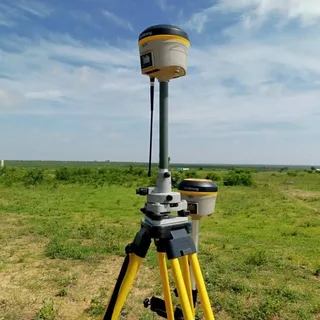
Real-Time Kinematic (RTK) GPS technology is widely used for high-precision positioning in fields like surveying, agriculture, and construction. However, despite its accuracy, users often encounter issues related to signal quality and correction errors that can disrupt operations. This article aims to guide users on troubleshooting common rtk gps signal and correction errors effectively, ensuring smoother workflows and improved data reliability.
Understanding RTK GPS and Its Signal Dependencies
RTK GPS systems rely on two components: a base station and a rover. The base station transmits correction data to the rover, which uses this information to correct its position in real time. The accuracy of the system depends heavily on the quality of the GPS signal and the integrity of correction data.
However, various factors such as environmental conditions, hardware malfunctions, and communication issues can lead to common RTK GPS signal and correction errors.
Common Causes of RTK GPS Signal Issues
1. Signal Obstruction and Multipath Effects
Physical obstructions like tall buildings, dense trees, and even heavy cloud cover can block or reflect GPS signals, causing multipath errors. These reflected signals confuse the GPS receiver, leading to inaccurate positioning.
2. Satellite Geometry and Signal Quality
The configuration of satellites in the sky, known as satellite geometry, directly affects signal accuracy. Poor geometry, often indicated by a low Position Dilution of Precision (PDOP), results in less reliable data.
3. Interference and Signal Jamming
Electromagnetic interference from nearby electronic devices or intentional signal jamming can degrade RTK GPS signal quality, causing interruptions or false corrections.
Troubleshooting Common RTK GPS Signal and Correction Errors
1. Check Antenna Placement and Environment
Ensure the GPS antenna has a clear, unobstructed view of the sky. Relocate equipment away from tall structures or dense foliage that might interfere with signals. Using a high-quality, well-maintained antenna can also reduce multipath effects.
2. Verify Satellite Connectivity and Signal Strength
Monitor satellite counts and signal strength through your RTK system’s diagnostic tools. If satellite visibility is low, try repositioning the receiver or wait for better satellite conditions.
3. Inspect Base Station and Rover Communication
RTK correction errors often arise from poor communication between the base station and rover. Check radio or internet links for interruptions or interference. Reset communication devices and verify frequency settings to restore connection quality.
4. Update Firmware and Software
Outdated firmware on GPS receivers or base stations can cause incompatibility issues or bugs. Regularly update your RTK equipment software to the latest versions recommended by the manufacturer.
5. Use Quality Correction Sources
Always use reliable correction data sources, whether from your base station, a network of reference stations, or satellite-based augmentation systems. Verify that correction formats (RTCM, CMR, etc.) are correctly configured for your equipment.
Conclusion
Mastering troubleshooting common RTK GPS signal and correction errors is essential for maximizing the precision and reliability of your RTK system. By understanding signal dependencies, identifying typical error sources, and following systematic troubleshooting steps, users can minimize downtime and ensure accurate positioning for their applications.
