


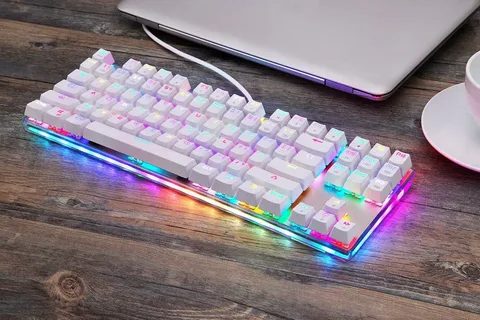
Mechanical keyboards have become increasingly popular among gamers, programmers, and typing enthusiasts. Among the most common layouts is the 87-key keyboard, also known as the Tenkeyless (TKL) keyboard. These compact yet functional keyboards offer a perfect balance of space and performance. But what really sets them apart is the ability to customize them—especially the keycaps.
In this article, we’ll dive into keycaps for 87 keyboards, explore customization tips, and share creative ideas to help you transform your typing experience.
Why Customize Your Keycaps?
Keycaps are the most visible and tactile part of your keyboard. Swapping out stock keycaps with custom ones can:
-
Improve typing comfort and accuracy
-
Enhance the aesthetic appeal of your setup
-
Reflect your personal style or interests
-
Extend the durability of your keyboard
For 87-keyboards, you get the best of both worlds: full functionality with fewer keys to customize, making keycap swaps more affordable and manageable.
Understanding Keycap Profiles and Materials
Before you buy keycaps for 87 keyboards, it’s important to understand the basics:
Keycap Profiles
Keycap profiles refer to the shape and height of each key. Some common profiles include:
-
OEM: Standard height; slightly curved
-
Cherry: Lower than OEM; preferred by many typists
-
SA: Tall and sculpted; retro look and feel
-
DSA: Flat and uniform; ideal for minimal designs
Try different profiles to see what feels best under your fingers.
Keycap Materials
-
ABS (Acrylonitrile Butadiene Styrene): Lightweight and cheaper, but prone to shine over time.
-
PBT (Polybutylene Terephthalate): More durable, with a textured feel and resistance to wear.
-
POM (Polyoxymethylene): Smooth and highly durable, though less common.
Top Customization Ideas for 87-Key Keyboards
1. Theme-Based Keycap Sets
Customize your keyboard to match your favorite themes, such as:
-
Anime or Gaming Themes (e.g., Naruto, Genshin Impact, Valorant)
-
Nature-Inspired Colors (forest greens, ocean blues)
-
Retro or Cyberpunk Vibes
There are plenty of artisan keycap makers producing stunning designs that fit 87-key layouts.
2. Artisan Keycaps
Mix a few artisan keycaps into your layout for a pop of personality. These hand-made, often sculpted keys can be placed on function or escape keys for a creative touch.
3. Backlit or Shine-Through Keycaps
If your keyboard has RGB lighting, consider shine-through keycaps. They allow the light to pass through legends, enhancing visibility and aesthetics.
4. Mix and Match Colors
Create your own custom layout by mixing colors from different keycap sets. Gradient, two-tone, and even rainbow layouts are popular choices for those looking to stand out.
Tips for Buying Keycaps for 87 Keyboards
-
Ensure Compatibility: Look for keycap sets labeled “TKL” or “87-key compatible.”
-
Check Key Sizes: The bottom row (Ctrl, Alt, Spacebar) can vary between brands.
-
Read Reviews: Check for durability, feel, and print quality before buying.
-
Use Online Layout Tools: Simulate different keycap layouts before committing to a design.
Final Thoughts
Customizing keycaps for 87 keyboard is a fun and rewarding way to personalize your workspace or gaming setup. Whether you’re aiming for better ergonomics or just want to express your unique style, the right set of keycaps can make a huge difference. With countless profiles, materials, and designs available, your perfect keyboard is just a few keypresses away.
