


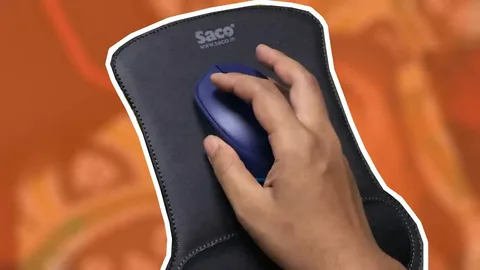
Imagine sitting at your desk ready to work or play and feeling frustration every time your mouse slips, drags, or strains your wrist. Small inconveniences like these can add up, making even simple tasks exhausting. Choosing the right mouse pad is more than picking a flat surface. It is about comfort, precision, and personal style. A 3d mouse pad designed with care can completely transform your desk experience, making every click and swipe effortless and enjoyable.
The right mouse pad doesn’t just support your hand; it enhances your workflow, prevents strain, and even adds personality to your workspace. Here’s how to select one that feels just right for you.
Understand Your Needs
Before choosing a mouse pad, consider how you will use it.
- Are you a gamer who needs fast and precise movement?
- Do you work long hours at a desk and want ergonomic support?
- Do you want a compact pad for portability or a large extended pad for full coverage?
- Are you looking for a personalized design to express your style?
Identifying your priorities ensures you select a mouse pad that matches both your work style and lifestyle.
Consider the Size and Shape
Mouse pads come in a variety of sizes and shapes to suit different setups.
- Small pads – Perfect for minimal desks or portable setups
- Medium pads – A balanced choice for general use
- Extended pads – Cover keyboard and mouse for maximum comfort
- Ergonomic shapes – Contoured designs provide better wrist alignment and natural movement
Choosing the right size and shape improves comfort and efficiency while preventing unnecessary strain.
Evaluate Material and Surface
The material affects both the feel and functionality of your mouse pad.
- Smooth fabric surfaces – Allow precise tracking and fast movements
- Textured or hybrid surfaces – Provide control for gaming or design tasks
- Memory foam wrist support – Reduces fatigue and prevents repetitive strain
- Non-slip base – Keeps the pad stable on any desk surface
Selecting quality materials ensures durability and enhances your daily experience.
Personalization and Style
A personalized mouse pad not only functions well but also reflects your personality.
- Choose colors or patterns that match your workspace or brand
- Add custom images, quotes, or artwork for a unique touch
- Select ergonomic designs with your comfort in mind
- Opt for double-sided options if you want versatility in style
A well-chosen personalized 3d mouse pad makes your desk both functional and visually appealing.
Test Ergonomics and Comfort
Your comfort is key when using a mouse pad for hours at a time.
- Check the height and softness of wrist support
- Ensure the pad promotes natural wrist alignment
- Test smoothness for effortless mouse movement
- Make sure edges are smooth to prevent irritation
A pad that feels just right minimizes strain and enhances long-term comfort.
Durability and Maintenance
A great mouse pad should withstand regular use without losing performance.
- High-quality prints that do not fade over time
- Sturdy memory foam that retains shape
- Water or stain-resistant surfaces for easy cleaning
- Non-slip backing that holds firmly in place
Durable construction ensures that your investment continues to provide comfort and precision for years.
Final Thoughts
Choosing the perfect mouse pad is about balance. A 3d mouse pad that combines size, material, ergonomic design, and personalization can make every work or gaming session smoother, more comfortable, and more enjoyable. Paying attention to these factors ensures that your mouse pad does more than support your hand; it supports your productivity and well-being.
With the right mouse pad, your desk setup becomes a tool for comfort, precision, and personal expression. Small adjustments like this can make a big difference every day.
